Verics – one interface for 24 AI providers.
Verics is the AI workspace by Webtrics – one interface for 24 AI providers like ChatGPT, Claude and Gemini. For everyone who writes, researches, analyses and creates documents: compare models and pick the best one for every task – with folders, a prompt library and agents.
Swiss Software. Full Data Control.
5 free prompts per day • No account or credit card required
Important: The Verics subscription covers the workspace and its features. AI provider usage is billed separately through your own API keys.
- Cancel anytime
- GDPR compliant
- API key stored encrypted
Compare model responses side by side
Compare different AI models in one workspace and choose the strongest response without switching between multiple apps.
THE LIMIT WALL
Stop paying more just to keep chatting.
Many free AI apps and entry-level plans come with usage limits. After a certain number of messages, you may be asked to wait, start a new chat or upgrade. Even paid plans can eventually push frequent users towards increasingly expensive tiers.
You know this message.
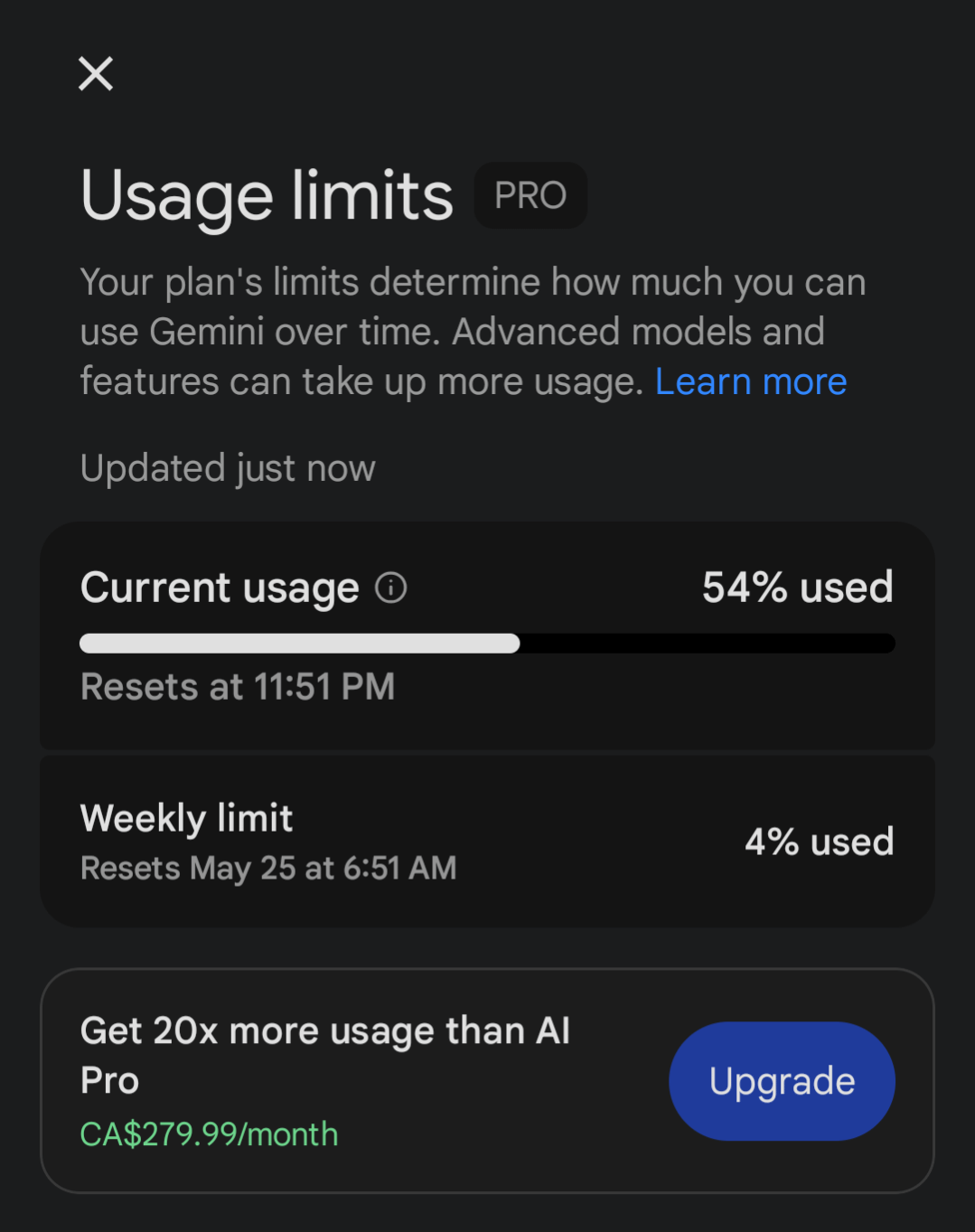
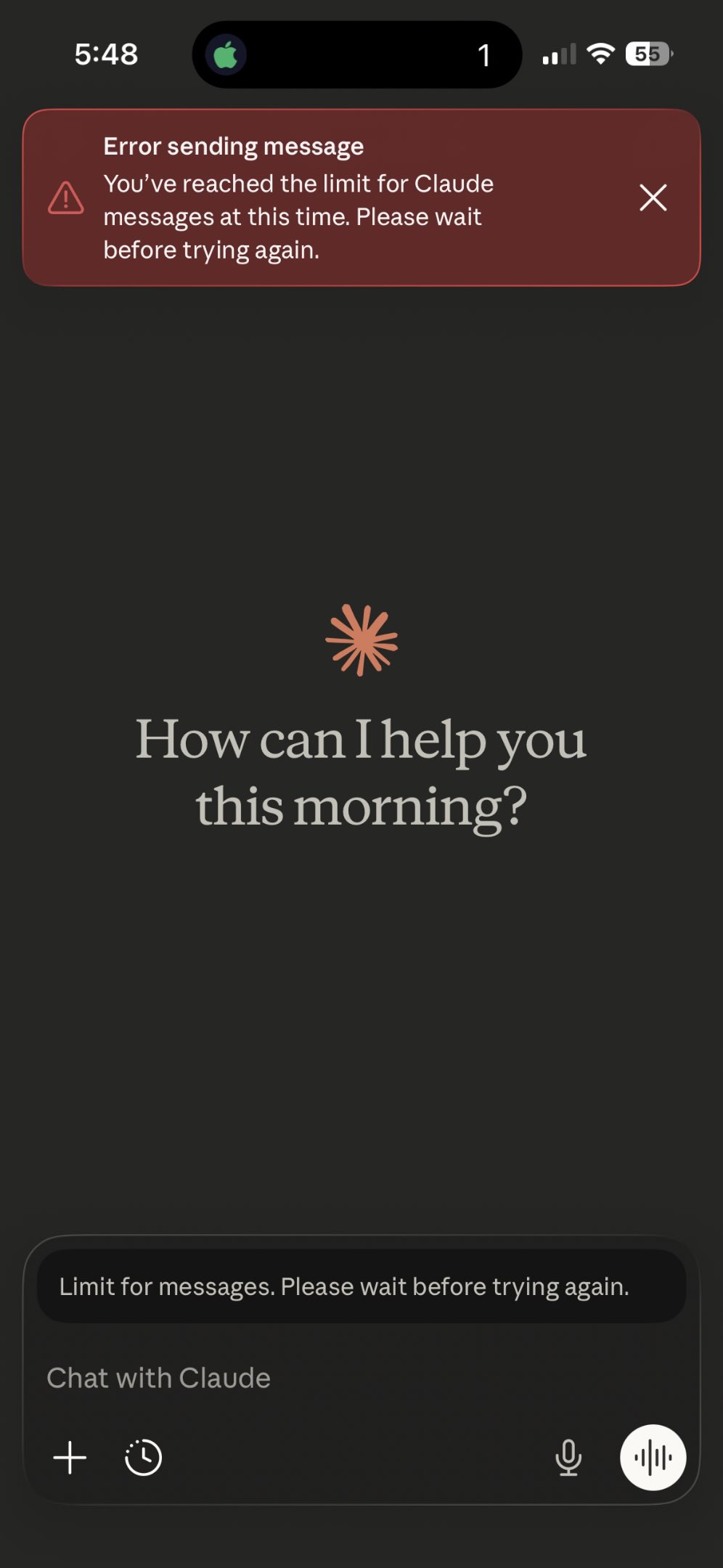

A real-world cost difference
I used to pay for OpenAI Pro, Gemini Pro and Claude Max — nearly 600 per month in total. Today, with Verics, I spend around CHF 60 per month. My usage has barely changed. If anything, I can do more, better and faster.
The traditional setup
- One app
- One provider
- One set of usage limits
- Wait or upgrade
- Multiple subscriptions can add up quickly
A more flexible way to work
- 24 AI providers in one interface
- Switch between models and providers
- Bring your own API key
- Less lock-in to one chat app
- More choice for every task
With Verics, you are not locked into one consumer chat app. Choose the provider and model that fit your task, and keep your entire AI workflow in one workspace.
Provider usage limits and API costs still depend on the selected provider, model and your actual usage. Verics gives you choice and flexibility; it does not remove the individual limits of every provider.
Everything Verics brings into one workspace
Verics is more than a single chat box. It combines models, research, your own knowledge and document creation in one place. Which models, tools and capabilities you see can depend on your plan and configuration.
Work with multiple AI models
Verics brings different AI providers and models together in one workspace, so you can pick the right tool for each task without switching apps.
- Choose from several providers and models
- Change the model for each individual chat
- Match the model to the task in front of you
Compare and run parallel conversations
See how different models respond to the same request, and keep more than one conversation moving at the same time.
- Compare model responses side by side
- Run several chats in parallel
- Keep separate threads for separate topics
Control reasoning and chat parameters
Tune how each conversation behaves, from how carefully the model reasons to how much context it keeps in view.
- Adjust reasoning strength where supported
- Set a context limit per chat
- Control temperature and maximum response length
- Set a system prompt globally and per chat
Organize chats, folders and prompts
Keep your work tidy as it grows, and reuse the prompts that work well for you.
- Group conversations into folders
- Use folder memory for related chats
- Save and reuse prompts from a prompt library
- Rename, search and share conversations
Work with files and images
Bring your own material into a conversation and let the model work with it directly.
- Upload PDF, Word, Excel spreadsheets and image files
- Upload EML and MSG email files, including embedded attachments
- Reference uploaded content in your questions
Search the web and conduct research
Go beyond the model's own knowledge when a task needs current or external information.
- Search the web from within a chat
- Choose a search provider
- Run deeper research and read full web pages
- See citations for information that was found
Use your own knowledge base
Give Verics a personal set of documents to draw on, with clear references back to your sources.
- Build a personal knowledge base from your files
- Get answers grounded in your own documents
- See citations back to the source material
Create documents and media
Turn a conversation into finished output — from formatted documents to generated images and video.
- Generate PDF, Word and PowerPoint documents
- Generate images and video
- Produce documents in multiple languages, with headers, footers and dates
Use specialized agents and routines
Choose a purpose-built agent for a task, and set routines to run on a schedule.
- Select specialized agents for specific work
- Use connected tools where they are configured
- Schedule routines to run automatically
Manage settings, usage and data
Keep control of your configuration, your data and your consumption from one place.
- Manage models, agents, knowledge base and chat parameters
- Import, export and back up your data
- Review consumption information and cost estimates where available
Work in multiple languages
Use Verics in the language that suits you, across the interface and the work it produces.
- Full support for English, German, French and Italian
- Multilingual interface and agent responses
- Multilingual emails and generated documents
Research notebooks
Bundle the sources, notes and AI results for a topic in a dedicated notebook.
- Link sources from your knowledge base and chat with them directly
- Keep notes and generate summaries, FAQs or reports
- Share notebooks and run multi-step agent workflows
AI podcasts and audio overviews
Turn documents, research and notes into naturally spoken audio episodes.
- Create and edit a script automatically from your sources
- Natural-sounding voices, including two-speaker dialogue
- Listen right away or download as an audio file (WAV)
FTP and server management
Manage files on your servers and web hosting directly from your AI workspace.
- Connect via FTP/FTPS – and via SSH with the server plugin
- Browse, read and edit files – changes only after your confirmation
- Run server commands and maintenance tasks with AI assistance
Trading and market analysis plugin
Analyse markets with AI and trade through your own broker account – with clear risk limits.
- Connect your own OANDA or Alpaca account
- Evaluate prices, positions and signals with AI, and receive signals via webhook
- Orders only after your confirmation and within your risk profile
Verics Live
Talk to Verics in real time: natural voice-to-voice conversations with low latency and a live transcript.
- Natural two-way voice conversations you can interrupt at any time
- Live transcript, saved to your chat when you end the session
- Work hands-free while Verics listens and answers out loud
Every top model for less than a ChatGPT Plus subscription
Instead of paying for a single model, Webtrics gives you 24 AI providers – from GPT, Claude and Gemini to Mistral, Grok & DeepSeek – at one fair yearly price.
ChatGPT Plus
- Only one model (GPT)
- No switching to Claude or Gemini
- No bring-your-own API key
- No real prompt management
For solo professionals
Single License
- 24 AI providers: GPT, Claude, Gemini & more
- Bring your own API key (BYOK)
- Fair yearly plan, cancel anytime
- Prompt library, folders, agents & more
For teams & companies
Enterprise License
- Full Single License feature suite for every seat
- Central cockpit: add, manage seats & assign roles
- Store API keys centrally or individually per seat
- Volume discounts up to 28% · corporate invoicing available
Important: The Verics subscription covers the workspace and its features. AI provider usage is billed separately through your own API keys.
Everything a real AI workspace needs
From model switching to privacy – all pro tools in one place.
24 AI providers in one interface
Switch easily between ChatGPT, Claude, Gemini and 21 other AI providers, all within Verics. Try different models without constantly moving between apps. Simply choose the provider that best suits the task at hand.
Bring your own API key (BYOK)
Connect your own API key to Verics and use the AI services of your choice. You pay only the actual usage costs charged by the providers, with no markup from Verics. This helps you keep track of your spending.
Prompt library
Save your most-used prompts in one place and reuse them in just a few clicks. Get started with ready-made templates and adapt them to your needs. You can also add as many of your own prompts as you like, keeping your best instructions close at hand.
Folders, pins and full-text search
Stay organised, even when you have lots of conversations. Sort chats into folders, pin important ones and search through their contents. That makes it easier to find the information you need.
AI agents and plugins
AI agents and plugins help you organise and simplify recurring tasks. Set up workflows that suit the way you work and cut down on repetitive manual steps. That leaves you with more time for tasks where your experience matters.
Privacy first
Verics is built with data protection in mind and is GDPR-compliant. Optional end-to-end encryption is available for your chats. Choose the privacy features that best suit your needs.
What you can do with Verics
One workspace for many tasks – here are a few typical ones.
Marketing and content
Compare responses from different AI models to find ideas that fit your communications more quickly. Draft campaigns, SEO copy, blog posts and other content, then tailor it to your brand and audience. Reusable prompts make recurring tasks easier to handle and help you organise your content workflow.
Research and knowledge work
Bring web research, files and your own knowledge resources together in a structured workflow. Summarise information, compare different perspectives or develop initial answers to specific questions. This helps you review large amounts of content more efficiently and put the results to use.
Development and productivity
Use different AI models to analyse code, compare approaches and work through technical questions. Reusable prompts and routines help you complete recurring tasks more quickly. Verics supports you in both software development and your everyday work.
One tool. Every leading AI provider.
From ChatGPT, Claude and Gemini to specialized providers – pick the best model for every task. For AI video, fal.ai is included too.
OpenAI
GPT-5 · GPT-4o · o-Serie
The GPT and o-series models behind ChatGPT – versatile for text, code and analysis.
Anthropic
Claude Opus · Sonnet · Haiku
Claude – strong at long documents, reasoning and safe output.
Gemini 2.5 Pro & Flash
Gemini – multimodal with a huge context window for text, images and data.
xAI
Grok 4 · Grok Code
Grok – up-to-date knowledge and strong coding skills from xAI.
DeepSeek
DeepSeek V3 & R1
Powerful reasoning models at very low prices.
Moonshot
Kimi K2
Kimi – shines with very long context and agentic capabilities.
Z.AI
GLM-4.6 · GLM-4.5
The GLM models – strong at coding and multilingual tasks.
Meta
Llama 4 Maverick & Scout
Llama – Meta's open model family, versatile and efficient.
Mistral
Mistral Large · Codestral
European models with a strong focus on efficiency and code.
Groq
Llama · Mixtral (LPU)
Extremely fast inference of open models thanks to specialized hardware.
Perplexity AI
Sonar
Sonar – answers with live web search and source citations.
Fireworks AI
Llama · DeepSeek · Qwen
Fast hosting of hundreds of open models for production.
DeepInfra
Open-Source-Modelle
Affordable access to a broad range of open models.
Vercel AI Gateway
200+ Modelle
One gateway to hundreds of models from many providers.
Chutes
DeepSeek · Qwen u. a.
Serverless hosting of open models at attractive prices.
Alibaba Cloud
Qwen Max · Plus · Turbo
The Qwen models – excellent multilingual and strong at coding.
Ollama Cloud
GPT-OSS · Qwen3 · DeepSeek
Large open models in the cloud – compatible with the Ollama ecosystem.
OpenCode Zen
Grok Code · Qwen3 Coder
Developer-focused models optimized for coding.
MiniMax
MiniMax M2
Efficient models with strong reasoning and agentic performance.
Xiaomi
MiMo
MiMo – compact, efficient models including vision.
Novita
Llama · DeepSeek · Qwen
Cloud access to many open models with a simple API.
OpenRouter
300+ Modelle
A single key for hundreds of models across every major provider.
fal.ai
VideoKI-Video & -Bild
For AI video and image generation right inside the Webtrics KI Tool.
Loved by AI power users
What people who use Webtrics every day are saying.
"I switch between GPT-4o and Claude mid-conversation. One tool for everything – exactly what I wanted."

"Every top model in one app for less than I paid for ChatGPT Plus alone. Easy decision."

"Interface in my language, GDPR-compliant privacy, support that replies. Perfect."

ONE PRICE. FULL CONTROL.
Select the ideal license for yourself or empower your entire organization.
For solo professionals
Single License
Your personal, unconstrained AI workstation.
Instant activation · annual license · secure payment via PayPal
- 24 AI providers: GPT, Claude, Gemini, DeepSeek & many more
- Bring Your Own Key (BYOK) for uncompromised privacy
- Prompt library, nested folders & custom AI agents
- Knowledge base (OneDrive / Notion / GitHub) & file uploads
- All future platform updates included
- Optional add-ons (Deep Research, Routines, Social Media, Trading, Server Management) available separately
Enterprise License
Centralized control, shared workspaces, and all premium research tools included.
Total annual investment:
$2,109$219
per seat / year
16% volume discount10 seats · Instant activation · annual license · secure payment via PayPal
- Full Single License feature suite for every team member
- Enterprise Admin cockpit: add, manage and revoke team seats instantly
- Global company API keys stored securely – members use models without key exposure
- Unlimited free sharing of folders, prompts and customized agents within your organization
- Deep Research Plugin included for all members
- Website Scraping & Extraction Plugin included for all members
- Scheduled Background Routines Plugin included for all members
- Expand seats anytime with seamless pro-rata invoicing
Frequently Asked Questions about Enterprise
The Enterprise Admin can invite exactly up to the booked number of team members. When adding more members mid-term, seats can be added instantly and are billed strictly pro-rata for the remaining contract duration.
Need more? Extend Verics with optional team seats, plugins, storage, and embedding credit.
See Verics add-onsExtend your Verics workspace
Add optional capabilities when your workflow needs more team capacity, deeper research, extra storage, or specialized tools.
Models, research, knowledge base, and document creation are part of the Verics base subscription – at no extra cost.
Optional add-ons are billed separately and require an active Verics subscription.
Team
Additional team seat
Add another person to your Verics workspace.
Requires an active Verics account
Premium plugins
Deep Research
In-depth, multi-step web research for complex questions.
$9.90/ monthRequires an active Verics account
Manage in VericsRead website
Read the content of entire web pages and use it in chat.
$5.90/ monthRequires an active Verics account
Manage in VericsAutomated routines
Schedule tasks that run automatically on a timetable.
$9.90/ monthRequires an active Verics account
Manage in Verics
Server management
Solo
$9.90/ month- 1 server profile
- Up to 100 log lines per fetch
- Most popular
Pro
$19.90/ month- Up to 5 server profiles
- Up to 500 log lines per fetch
Agency
$29/ month- Unlimited server profiles
- Up to 500 log lines per fetch
Knowledge & storage
Additional storage
Expand your file and knowledge storage beyond the included quota.
$49/ GB per yearYearly · Requires an active Verics account
Manage in VericsEmbedding credit
Extra capacity to index content for your knowledge base.
$9.90per 500 MBOne-time · Requires an active Verics account
Manage in Verics
Optional add-ons are billed separately and require an active Verics subscription.
Frequently asked questions
Everything you need to know before buying.